If your chat messages aren't showing up for other viewers or your stream has vanished from category browse, you're likely dealing with one of two separate problems: a chat suppression flag or a discoverability throttle. Run the alt-account chat test first, then check your category page in a logged-out browser. Chat flags often clear within a few days once the triggering behavior stops; discoverability recovery usually takes about one to two weeks.
TL;DR:
- Chat suppression is caused by automated spam filters reacting to message patterns, which typically clear within a few days if the behavior stops.
- Discoverability throttling results from trust signals like guideline violations or artificial engagement, taking one to two weeks to recover.
- Running the alt-account chat test and a logged-out discovery check can confirm whether your issue is chat suppression, discoverability throttling, or both.
- Repeat offenses, low account trust, or DMCA strikes extend enforcement durations, sometimes lasting several days to several months depending on severity.
- A proper recovery involves halting high-risk activities, removing flagged content, and gradually restoring normal activity, without rushing into support tickets or appeals.
Table of Contents
- What Is a Twitch Shadowban, Exactly?
- How to Check for a Twitch Shadowban in Under 10 Minutes
- What Actually Triggers Chat and Discovery Suppression
- How Long Does a Twitch Shadowban Actually Last?
- Your Step-by-Step Twitch Shadowban Recovery Plan
- Using Twitch's Appeals Portal the Right Way
- Preventing the Next Shadowban Before It Happens
- What Streamers Actually Report About Shadowbans
- Does a Shadowban Cover Everything You Do, or Just Specific Actions?
- What I've Learned Watching Streamers Handle This Badly (and Well)
- When a Paid Boost Makes Sense in Your Comeback Plan
- Sources
What Is a Twitch Shadowban, Exactly?
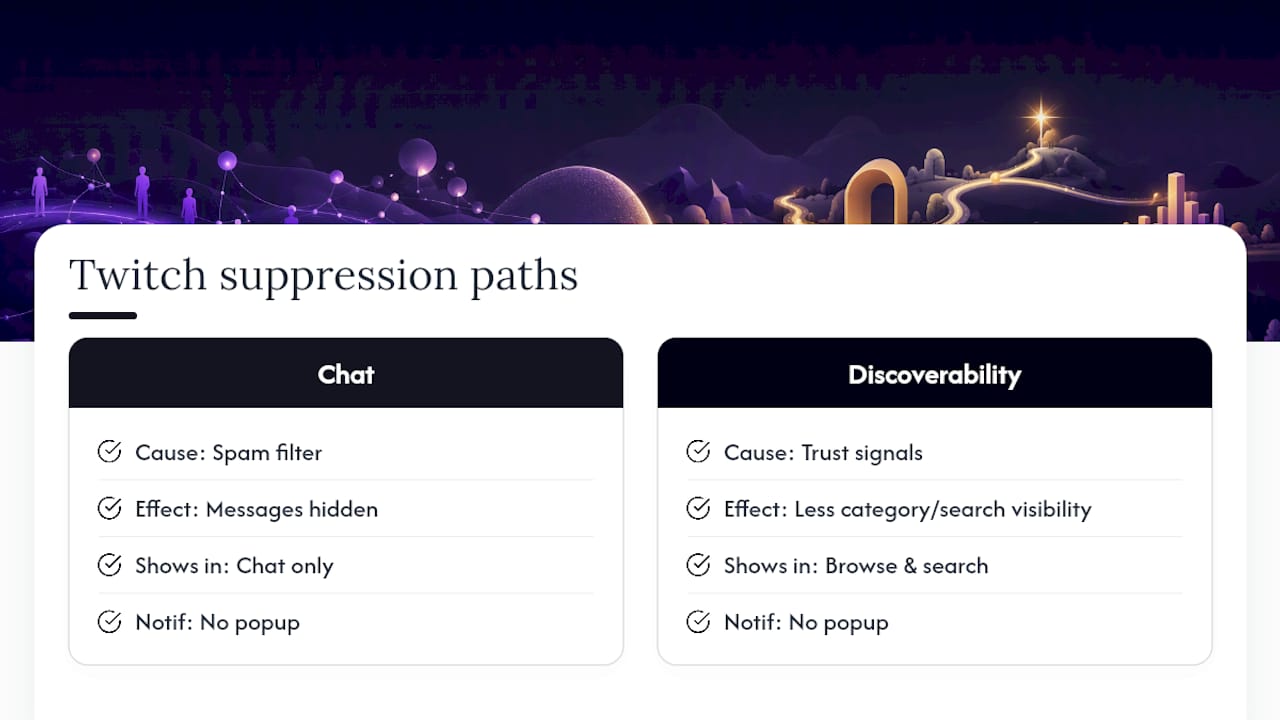
Twitch has never officially used the word "shadowban." It's a term the streaming community coined to describe two things Twitch's own systems do quietly: hide your chat messages from other users, or reduce how often your stream shows up in category pages, search, and recommendations. Neither comes with a pop-up notification the way a suspension does.
That distinction matters for how you diagnose the problem. Chat suppression is usually the result of an automated spam filter reacting to your message patterns. Discoverability throttling is more often tied to how Twitch's recommendation systems weigh trust signals like account history, viewer authenticity, and guideline compliance. Streamers frequently report a drop in recommendations or search placement after a borderline violation, even when no formal enforcement action ever lands in their inbox.
The two symptoms can show up together or separately. You might have full chat visibility but zero presence in your category's browse grid. Or your messages might be invisible to others while your stream still pulls in organic search traffic just fine. Treating them as one problem with one fix is the most common mistake streamers make, and it's why so many people spend a week troubleshooting the wrong thing.
How to Check for a Twitch Shadowban in Under 10 Minutes
You don't need a third-party tool to figure this out. The two tests below are the same ones experienced moderators and streamers use, and they take less time than reading this section.
1. The alt-account chat test. Open a second account, or better yet, borrow a friend's logged-in device so you're not relying on your own browser cache. Join one of your own streams or a busy channel where you're active, then send a message from your main account. Watch the alt account's chat window in real time.
- If the message never renders on the alt account but shows up fine on your own screen, that's a strong signal of chat-level suppression.
- If it renders normally, your chat is visible and any issue you're experiencing is on the discoverability side.
2. The logged-out discovery check. Go live, then open an incognito or fully logged-out browser and navigate to your game or "Just Chatting" category. Scroll through the grid and look for your thumbnail. Ask someone who has never followed you to search your channel name directly.
- Missing from the category grid but findable by direct search usually points to a recommendation throttle rather than a full suppression.
- Missing everywhere, including direct search while live, is a more serious signal worth escalating.
Cross-check both tests against your analytics. A sudden drop in new follower notifications, a flatline in VOD view counts, or a sharp dip in average viewers with no change in your schedule all support a discoverability issue. Third-party "shadowban checker" sites can only read public data like directory presence, they cannot see Twitch's internal moderation flags, so treat their results as a hint, not a verdict. Never hand over your OAuth token or password to any checker tool that asks for account access. That's a security risk, not a diagnostic feature.
What Actually Triggers Chat and Discovery Suppression
Most suppression cases trace back to one of five patterns, and they rarely happen in isolation.
- Spam behavior: Mass-posting the same message, flooding chat with links across multiple channels, or repeating identical phrases trips Twitch's automated anti-spam filters almost instantly.
- Community Guidelines violations: Harassment, hateful conduct, or sexual content violations lead to formal enforcement, which ranges from a warning to a temporary or indefinite suspension, according to Twitch's Community Guidelines.
- DMCA strikes on VODs: Copyrighted music or clips in your archived content can trigger takedowns that quietly reduce how often that content, and sometimes your channel, surfaces in search.
- Artificial engagement signals: Sudden, unnatural spikes in viewers or followers, especially from viewbotting, can read as suspicious traffic to Twitch's systems and trigger a discoverability throttle even without a formal strike.
- Low account trust: New accounts, unverified email or phone numbers, and a history of repeat infractions all lower your standing with Twitch's automated systems, making future flags more likely and recovery slower.
Statistic Callout: Twitch's own enforcement documentation notes that violation records expire in 90 days for lower-severity infractions but stick around for 1 to 2 years for higher-severity ones, and repeat violations within that window escalate the enforcement response. That window is the single biggest factor in how long a "shadowban" actually lingers.
Viewbotting deserves special attention here because it's often self-inflicted. A streamer buys or accepts a shady bot package to inflate viewer counts, Twitch's fraud detection flags the traffic as inorganic, and the channel ends up with a trust penalty that's harder to shake than a simple spam flag.
How Long Does a Twitch Shadowban Actually Last?
Recovery time depends entirely on which restriction you're dealing with and whether it's tied to a formal enforcement action or an informal trust signal. Formal suspensions have documented windows. Informal throttles are murkier, but real-world reports give a fairly consistent picture.
| Restriction type | Typical duration | Notes |
|---|---|---|
| Chat spam flag | a few days | Clears once the triggering behavior stops completely |
| Discoverability throttle | 1 to 2 weeks | Longer for repeat offenses or if the trigger behavior continues |
| Temporary suspension | several days to a month | Length is set by Twitch based on severity, per Twitch's enforcement guidance |
| Indefinite suspension | No fixed end date | Requires a formal appeal and follows specific reinstatement timing rules |
| Violation record expiration | 90 days to 1 to 2 years | Shorter window for lower-severity issues, longer for serious ones |
The escalation pattern is worth internalizing: a first offense that would normally clear in days can turn into a much longer restriction if it's your second or third flag within the same violation window. Twitch's system is explicitly designed to treat repeat behavior as a trust problem, not just an isolated incident, which is part of why the same mistake gets punished harder the second time around.
Your Step-by-Step Twitch Shadowban Recovery Plan
Work through these in order. Skipping ahead to appeals before you've stopped the triggering behavior almost never works.
- Check the Appeals Portal first. Log into the Twitch Appeals Portal to see if there's a formal enforcement on record. If nothing shows up, you're likely dealing with an informal throttle rather than a documented suspension, and a support ticket will serve you better than an appeal.
- Remove obvious red flags. Delete or unpublish VODs and clips that used unlicensed music, contained flagged content, or triggered a DMCA notice. Verify your account email and phone number if you haven't already.
- Pause every high-risk activity. Stop any third-party chat automation, cut out link spam in your own messages, and halt aggressive follow-for-follow or cross-posting campaigns. If you were running any viewer or engagement bots, turn them off completely.
- Run a clean restart. Stream guideline-safe content for at least a week. Skip unlicensed music entirely and ask your moderators to actively enforce chat rules rather than letting borderline behavior slide.
- Verify recovery methodically. Repeat the alt-account chat test and the logged-out discovery check every few days. Watch your analytics for a return to normal follower and VOD view patterns, and keep a simple log of dates and actions taken in case you need to reference it in a support request later.
Pro Tip: Keep screenshots of your alt-account test results dated and organized in a folder. If your issue doesn't resolve on its own and you need to open a support ticket, having a clear before-and-after timeline is far more persuasive than describing the problem from memory.
The biggest mistake in this sequence is jumping straight to step 5 without doing steps 2 through 4 first. Twitch's trust systems respond to sustained clean behavior, not a single good stream.
Using Twitch's Appeals Portal the Right Way
The Appeals Portal exists for one specific purpose: contesting formal enforcement actions that Twitch has already recorded. If you've run your diagnostic tests and found no record in the portal, you're dealing with an informal restriction that has no paperwork attached, and appealing something that doesn't exist as a formal record won't get you anywhere. A detailed support ticket works better in that case.
When you do have a documented suspension to contest, know the limits going in:
- Appeals for suspensions of 30 days or less are capped at one appeal per enforcement, according to Twitch's own suspension policy.
- Indefinite suspensions follow specific reinstatement timing rules rather than a simple appeal-and-wait process.
- A strong appeal includes exact dates, your alt-account test results, screenshots of the issue, and a short, factual timeline. Vague appeals ("I don't know why this happened") get denied far more often than specific ones.
- Channel-level bans on specific users can be handled separately through the Unban Request feature, which routes directly to your moderator team rather than Twitch support.
Since you only get one shot at most short suspensions, write the appeal once, write it well, and don't submit it until you've gathered every piece of supporting evidence.
Preventing the Next Shadowban Before It Happens
Recovery is only half the job. The habits below are what keep you off Twitch's radar in the first place.
- Set up AutoMod and build a custom block list tuned to your community rather than relying on default settings alone.
- Appoint moderators you trust and give them clear, written rules to enforce consistently rather than reactively.
- Use only licensed or stream-safe music, and pull down any VOD that triggers a copyright claim as soon as you notice it.
- Verify your account's email and phone number, and steer clear of third-party automation tools that promise instant growth through unclear methods.
- Stick to a consistent streaming schedule. Twitch's recommendation systems reward predictable, quality content over sporadic bursts of activity.
Pro Tip: Review your AutoMod settings once a month. Twitch updates its filter sensitivity periodically, and a setting that worked fine six months ago can start flagging normal chat activity if your community's slang or inside jokes have shifted.
Proactive moderation isn't just about avoiding penalties. It's the fastest way to build the kind of account history that makes Twitch's systems less likely to flag you in a gray-area situation down the line.
What Streamers Actually Report About Shadowbans
Search any Twitch subreddit or Discord server for "shadowban" and you'll find a fairly consistent pattern in the reports. Streamers describe a sudden drop in category visibility right after a copyright strike or after a run of aggressive self-promotion in other channels' chats. Others report chat messages going invisible for a day or two after using the same phrase repeatedly, usually while trying to hype a giveaway or raid.
What's notable is how often streamers say the issue resolved on its own once they simply stopped the behavior and waited. Very few report needing a support ticket for chat-level issues. Discoverability complaints skew differently. Streamers frequently describe weeks of reduced visibility with no clear trigger they can point to, which lines up with how opaque Twitch's recommendation weighting can be from the outside.
A recurring theme in these community threads is confusion between a genuine throttle and simple bad timing. A category getting more crowded, a schedule change, or a slow week for a game's overall viewership can look identical to a shadowban if you're only watching your own numbers without context. Experienced streamers tend to recommend comparing your metrics against a few peers in the same category before concluding you've been flagged. It's not a perfect method, but it filters out a lot of false alarms.
Does a Shadowban Cover Everything You Do, or Just Specific Actions?
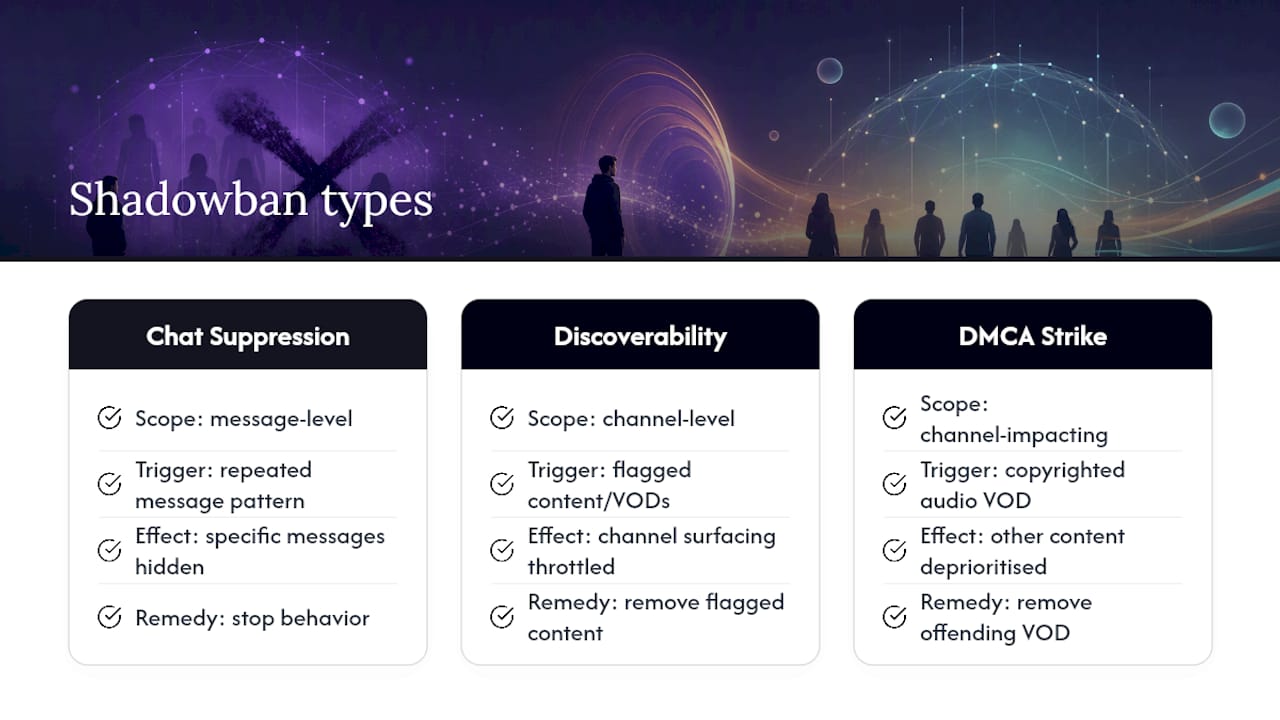
A shadowban isn't a blanket penalty against your entire account. It's almost always tied to a specific action or content type, which is exactly why two streamers can experience completely different symptoms from what looks like a similar mistake.
Chat suppression typically targets the exact message pattern that triggered it. If you got flagged for posting a link repeatedly, that specific behavior is what's suppressed, not your ability to chat in general. Stop the behavior and the flag usually clears within the timelines covered earlier. Discoverability throttling works differently: it tends to apply at the channel level rather than to a single piece of content, which is why a single flagged VOD can drag down how your whole channel surfaces in browse and search, even though your other content never violated anything.
This is also where DMCA strikes behave differently from most other triggers. A single VOD flagged for copyrighted audio doesn't just get muted or removed. It can act as a signal that affects how the platform treats your other, unrelated content for a period of time. That's an important distinction if you've only ever had music-related issues and assumed the fix was as simple as swapping your stream soundtrack. Removing the offending VOD helps, but rebuilding full discoverability still takes the same 1 to 2 week window as any other throttle.
What I've Learned Watching Streamers Handle This Badly (and Well)
The streamers who dig themselves into a deeper hole almost always do the same thing: they panic and start switching accounts, buying sketchy bot traffic to "prove" they're still relevant, or blasting their community asking for mass follows. Every one of those moves adds a new trust problem on top of the original one.
The ones who recover fastest do something less exciting. They document what happened, loop their moderators in immediately, and work the recovery sequence in order without skipping steps. If they bring in paid help along the way, they're upfront about it with their community rather than pretending a metric bump appeared organically. That transparency, more than any specific tactic, is what separates a clean comeback from a longer mess.
— Backwards
When a Paid Boost Makes Sense in Your Comeback Plan
Sometimes the DIY recovery sequence works, but you still need your channel metrics to look healthy while Twitch's systems catch up, especially if a sponsorship deadline or a monetization threshold is on the line. That's a legitimate, time-sensitive gap, not a shortcut around the guidelines.
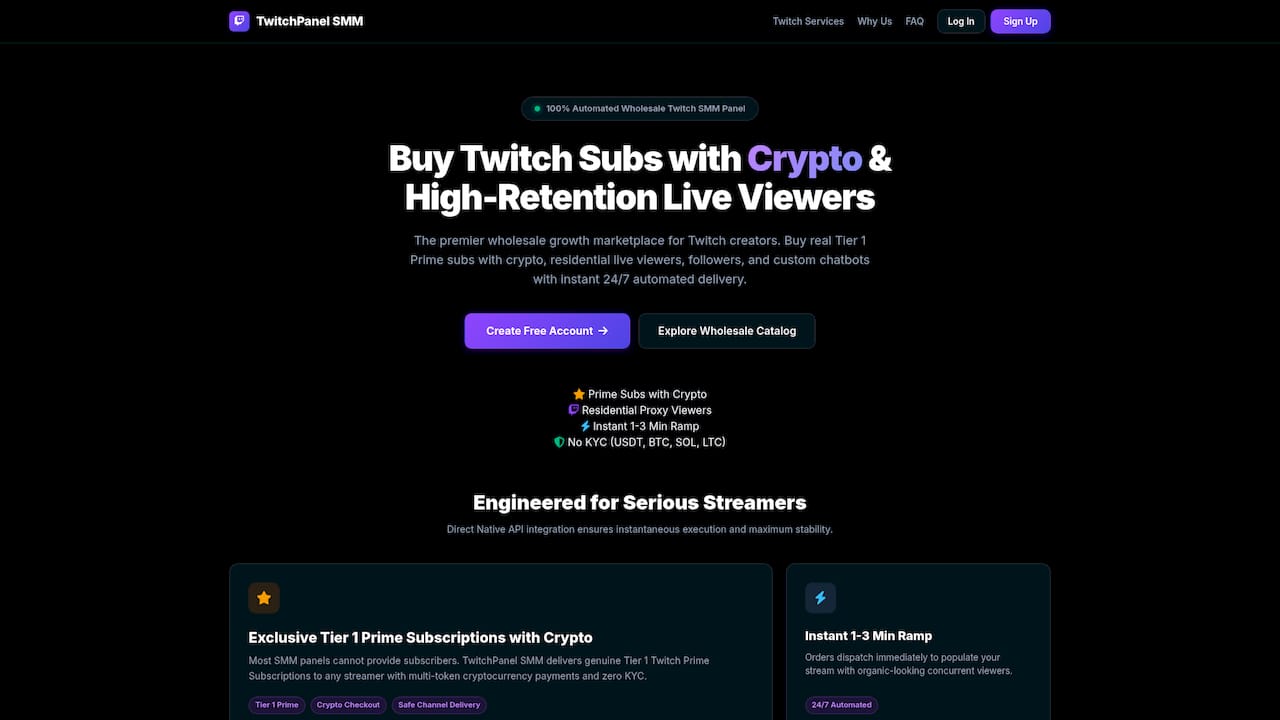
There are wholesale marketplaces where creators can access Tier 1 Prime subscriptions, live viewers supported by residential IPs, and custom chatbots, delivered through direct API integration for quick execution without slow manual processes. Some providers offer rapid order execution and crypto payment options without requiring KYC paperwork. Combine that speed with the recovery steps above, not instead of them, and you get a channel that looks and performs healthier while you're rebuilding algorithmic trust the honest way.
Before you buy from anyone, ask three questions: do they disclose how their viewer traffic is sourced, do they offer any guarantee or refund policy, and can they explain their delivery method in plain terms. If a vendor dodges those questions, walk away. Check Twitchpanel's service lineup directly and see which package matches where your channel stands right now.